
 admin
admin Once you’ve typed on a good mechanical keyboard, going back to a membrane laptop keyboard feels like writing with a crayon. Mechanical keyboards offer better tactile feedback, longer lifespan (50–80 million keystrokes vs 5 million for membrane), and a genuinely more satisfying typing experience. Whether you’re a developer, writer, or gamer, here are the best mechanical keyboards of 2026.
Best Mechanical Keyboards 2026 — Quick Comparison
| Keyboard | Switch | Layout | Score | Price |
|---|---|---|---|---|
| Keychron Q1 Pro | Gateron G Pro Red/Brown | 75% | 94/100 | Check Price |
| Logitech MX Keys S | Scissor (low-profile) | Full | 91/100 | Check Price |
| Keychron K8 Pro | Gateron G Pro (Red/Brown/Blue) | TKL 80% | 90/100 | Check Price |
| Ducky One 3 | Cherry MX (various) | Full / TKL | 88/100 | Check Price |
| Razer BlackWidow V4 | Razer Yellow / Green / Orange | Full | 86/100 | Check Price |
1. Keychron Q1 Pro — Best Mechanical Keyboard Overall
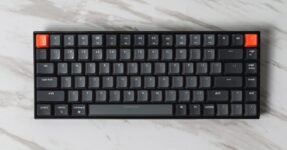
The Keychron Q1 Pro is the mechanical keyboard we’d recommend to almost everyone who types seriously. Aluminum CNC body (zero flex, substantial feel), pre-lubed Gateron G Pro switches, gasket mounting (absorbs typing shock for a cushioned, premium feel), Bluetooth 5.1 wireless + USB-C wired, and fully hot-swappable switches (change switches without soldering). The 75% layout keeps function keys and arrow keys while eliminating the number pad — the sweet spot for desk space vs functionality. Works with Windows and Mac (includes both key cap sets).
The Q1 Pro sounds exceptional — the combination of aluminum body, gasket mount, and lubed switches produces a deep, satisfying thock with minimal ping. For anyone who types 6+ hours a day, this is a genuine upgrade to your workday.
- Premium aluminum build
- Gasket mount (cushioned typing)
- Hot-swappable switches
- Wireless + wired
- Windows & Mac compatible
- Excellent sound profile
- $170–$200 price
- Heavy (1.5kg — not portable)
- No RGB (only south-facing LEDs)
2. Keychron K8 Pro — Best Value Mechanical Keyboard
The Keychron K8 Pro is the Q1 Pro’s more affordable sibling: TKL layout (no number pad, keeps full arrow and nav cluster), hot-swappable, Bluetooth + USB-C, and Gateron G Pro switches. The body is polycarbonate rather than aluminum, which affects the sound profile (slightly higher pitch) but keeps the price at $90–$100. For first-time mechanical keyboard buyers or those who want wireless freedom without the Q1 Pro’s premium price, the K8 Pro is the pick.
3. Logitech MX Keys S — Best for Office/Professional Use
The Logitech MX Keys S isn’t a traditional mechanical keyboard — it uses low-profile scissor switches that feel closer to a premium laptop keyboard. But for office workers who want multi-device Bluetooth switching (3 devices, one button), quiet typing in open offices, and the best non-mechanical typing feel, the MX Keys S is the pick. Backlit keys, USB-C charging (10 days per charge), and Smart Actions for app-specific key shortcuts make it the productivity keyboard for professionals who don’t want a loud clacking board in a meeting.
Check Logitech MX Keys S Price →
4. Razer BlackWidow V4 — Best Gaming Mechanical Keyboard
The Razer BlackWidow V4 is the go-to for gaming setups. Razer’s linear Yellow switches (45g actuation, near-silent) or tactile Orange switches both perform excellently for gaming. Per-key Razer Chroma RGB (16.8 million colors, syncs with games and Razer peripherals), media dial, macro keys on the left side, and a magnetic wrist rest included. The full layout means all keys are available for game bindings. For PC gamers who want the full Razer ecosystem integration, the BlackWidow V4 delivers.
Check Razer BlackWidow V4 Price →
Switch Guide: Red vs Brown vs Blue
Red (linear): Smooth, no tactile bump, quiet. Best for gaming and fast typists who don’t want feedback. Brown (tactile): Slight bump at actuation, moderate sound. The most popular switch for mixed gaming/typing. Blue (clicky): Loud click + tactile bump. Satisfying for typing, annoying for everyone else in the room. Best avoided in offices or shared spaces.
These keyboards pair well with a proper desk setup — check our best ultrawide monitor guide and 4K monitors under $500 to complete your setup.
Frequently Asked Questions
Are mechanical keyboards worth it?
Yes, if you type more than 4 hours a day. The tactile feedback reduces errors, the longer key travel reduces finger fatigue, and the build quality means mechanical keyboards last 10–15+ years vs 2–5 for typical membrane keyboards.
What mechanical keyboard switch should a beginner buy?
Brown switches are the safest starting point — tactile enough to feel satisfying, quiet enough for most environments. If you game more than type, red switches.
Are wireless mechanical keyboards reliable?
Yes — Keychron’s Bluetooth implementation is stable and low-latency for typing. For competitive gaming requiring sub-1ms latency, wired connections remain preferred. For office use, wireless is completely reliable.
What is hot-swappable?
Hot-swappable keyboards let you pull out and replace switches without soldering. This means you can change your switch type anytime — try tactile, then switch to linear — without buying a new keyboard.






 Germany
  France
  Netherlands
  Canada
  United Kingdom
  United States
  Turkey
  Croatia
  Spain
Spain  Italy
Italy  India
India