
 admin
admin Tablets have found their niche in 2026: media consumption, digital note-taking, drawing, and light productivity. The under-$500 market is more competitive than ever, with Apple, Samsung, and Amazon all offering genuinely capable options. Here are the best tablets under $500 we’d actually recommend.
Best Tablets Under $500 2026 — Quick Comparison
| Tablet | Display | Best For | Score | Price |
|---|---|---|---|---|
| Apple iPad (10th Gen) | 10.9″ Liquid Retina | Best overall | 92/100 | Check Price |
| Samsung Galaxy Tab S9 FE | 10.9″ LCD | Best Android | 88/100 | Check Price |
| Apple iPad Air M1 | 10.9″ Liquid Retina | Best performance | 94/100 | Check Price |
| Amazon Fire HD 10 | 10.1″ Full HD | Best budget | 78/100 | Check Price |
| Samsung Galaxy Tab A9+ | 11″ LCD | Best mid-budget | 84/100 | Check Price |
1. Apple iPad Air M1 — Best Tablet Under $500 Overall
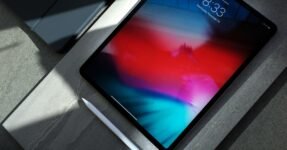
The iPad Air with M1 chip is available in the $499 range and delivers iPad Pro-level performance at a significantly lower price. M1 chip (the same chip in the MacBook Air) makes this the fastest tablet under $500 by a considerable margin. The 10.9″ Liquid Retina display is bright, accurate, and ideal for both media and creative work. Apple Pencil (2nd gen) support makes it the best drawing and note-taking tablet available. USB-C charging. 5G optional. Works with the Magic Keyboard for laptop-style productivity.
Who should buy it: Anyone in the Apple ecosystem who wants a premium tablet experience at the lowest Apple Air price point. Students, digital artists, and professionals who use iPad for meetings and presentations.
- M1 chip — class-leading performance
- Apple Pencil 2 support (drawing/notes)
- Liquid Retina display accuracy
- Full iPadOS ecosystem
- Magic Keyboard compatible
- Apple Pencil sold separately ($129)
- Magic Keyboard sold separately ($299)
- iPadOS limitations vs full laptop
2. Apple iPad (10th Gen) — Best Value Apple Tablet
The standard iPad (10th generation) at $329–$449 is the iPad for most people. A14 Bionic chip (fast enough for all typical tasks), 10.9″ Liquid Retina display, USB-C, and Apple’s unmatched iPadOS ecosystem. The redesigned 10th gen moved to a modern flat-edge design that’s a massive aesthetic improvement over the 9th gen. Supports Apple Pencil (1st gen — older model with adapter). Excellent for media, browsing, email, video calls, and light creative work.
Check Apple iPad (10th Gen) Price →
3. Samsung Galaxy Tab S9 FE — Best Android Tablet Under $500
The Samsung Galaxy Tab S9 FE (Fan Edition) brings the Galaxy Tab S9 experience to a more accessible price. IP68 water resistance (the only under-$500 tablet with this rating), S Pen stylus included (note-taking and drawing without extra cost), and Samsung’s DeX mode for laptop-style desktop interface via external monitor. Octa-core processor handles streaming, productivity, and light gaming. For Android users who want the best tablet ecosystem, the Tab S9 FE is significantly better than budget alternatives.
Check Samsung Galaxy Tab S9 FE Price →
4. Amazon Fire HD 10 — Best Budget Tablet
At $99–$150, the Amazon Fire HD 10 is for one use case: media consumption in the Amazon ecosystem. Watch Prime Video, listen to Audible, browse Amazon, use Alexa. The 10.1″ Full HD display is adequate. The processor is slow by modern standards. No Google Play Store. If you live in Amazon’s ecosystem and want a cheap media tablet for the couch, bedroom, or kids, the Fire HD 10 delivers. For anything beyond that, spend more.
Check Amazon Fire HD 10 Price →
iPad vs Android Tablet: Which to Choose?
Choose iPad if: You have an iPhone or Mac. The ecosystem integration (AirDrop, Handoff, Universal Clipboard, iCloud) is seamless in ways Android can’t match. The App Store has better tablet-optimized apps. Apple Pencil is the best stylus available.
Choose Samsung Galaxy Tab if: You use Android, want more file system freedom, prefer Google services, or want an S Pen stylus included (Tab S9 FE). Samsung DeX mode is a genuine laptop alternative for productivity.
Frequently Asked Questions
Is a tablet worth buying in 2026?
Yes — if your use case fits tablets: media consumption, digital drawing, note-taking, light productivity on the couch or in transit. For heavy productivity (coding, video editing, document work), a laptop remains superior.
Can a tablet replace a laptop?
For most students and light users: iPad Air + Magic Keyboard comes close. For power users: no. Tablets lack full desktop application support, limited multitasking, and no local file system management. The best use case is as a second screen or specialized device alongside a laptop.
Which tablet is best for drawing?
iPad Air M1 with Apple Pencil 2nd gen is the best drawing tablet available at this price. The combination of pressure sensitivity, tilt detection, near-zero latency, and Procreate software is unmatched.
Do Samsung tablets work with iPhone?
Basic functions yes (both connect to Wi-Fi, stream the same services). Deep integration (AirDrop, iMessage, Handoff) doesn’t work. Mixed Apple/Samsung households miss out on seamless device handoff features.







 Germany
  France
  Netherlands
  Canada
  United Kingdom
  United States
  Turkey
  Croatia
  Spain
Spain  Italy
Italy  India
India