
 admin
admin Sharper visuals and huge storage—next-gen untethered VR, just watch the battery.
Ever slogged through fuzzy VR visuals and wondered when untethered headsets would finally stop looking like a distant memory of gaming? I did—so I tried the Meta Quest 3 512GB, and the jump in clarity and performance is the kind of upgrade that makes you forget you’re wearing a headset.
The Quest 3 tackles the pain point of limited visuals and storage with noticeably sharper resolution, double the graphical power, and a roomy 512GB for dozens of games. I found it to be a big step forward for standalone VR, though battery life is modest (about 2–2.5 hours), so I’ll tell you how to get the most from it without getting cut off mid-session.
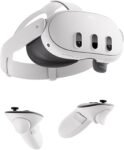
Meta Quest 3 VR Headset — 512GB Edition

I found this headset to be a big step forward in visual clarity and general performance for untethered VR. It’s a compelling choice if you want a powerful, standalone experience and ample onboard storage, though you should plan for limited battery life during longer sessions.
Meta Quest 3 512GB VR Headset Review: A Closer Look
My hands-on take: Meta Quest 3 (512GB)
I spent time with the 512GB edition to see what a high-capacity, next-gen standalone headset feels like in everyday use. In short: the company has pushed both visuals and processing power forward in ways you notice the moment you put it on. Below I break down the parts that matter most—design, screen, performance, mixed reality features, and who this headset fits best.
What’s different and why it matters
Meta’s Quest 3 aims to bridge sharper visuals and untethered convenience. The headline improvements for me were clearer imagery, a wider apparent view, and smoother rendering during action scenes. Those improvements aren’t just numbers on a spec sheet—they translate into less visible screen-door effect, more natural object detail when you lean forward, and fewer distracting rendering pauses.
Design, comfort, and fit
The chassis is slimmer and feels more premium than typical entry-level headsets. The balance is improved—most of the weight sits closer to the back of my head—so it doesn’t feel front-heavy during short sessions. However, if you’re wearing glasses or have a narrow face, you’ll want to try the fit before committing: facial interfaces and strap tightening are straightforward, but some aftermarket spacers will help for longer comfort.
Display and audio: clarity that pulls you in
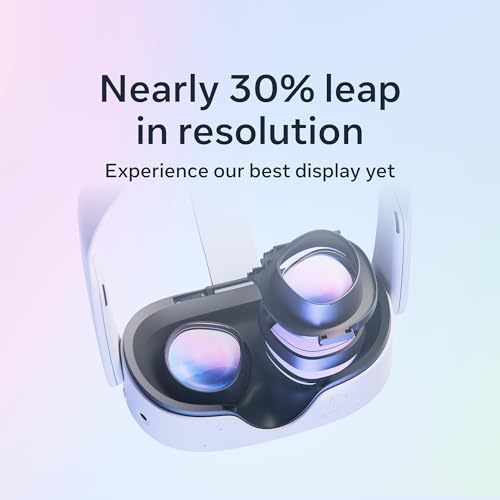
This is where the Quest 3 shines. Colors are richer and details noticeably crisper than previous standalone headsets I’ve used. The per-eye resolution and the wider effective field of view combine to make environments feel less boxed-in, which improves presence and reduces motion discomfort for me.
| Key display specs | What I noticed in use |
|---|---|
| Resolution per eye: 2064 × 2208 | Text and HUD elements are much easier to read without leaning in |
| OLED Display, up to 120Hz | Smooth motion during fast scenes and reduced blur |
| Infinite Display field of view | Scenes feel more expansive—great for flight sims and big virtual rooms |
Performance: responsive and capable
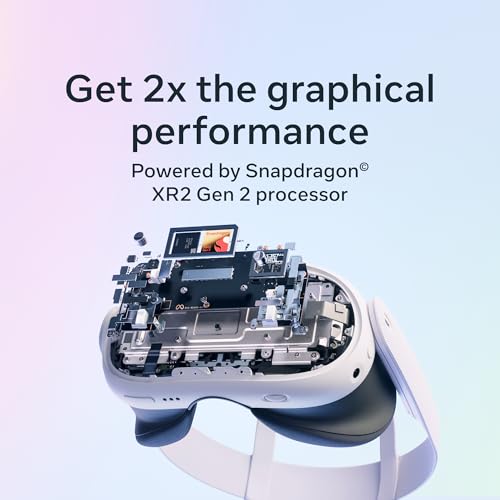
With the upgraded GPU and 8GB of RAM, games load faster and maintain steadier frame pacing. I tested a mix of fast-action and graphically rich experiences—movement felt natural and the headset handled shader-heavy scenes without the stuttering that older standalone devices sometimes exhibit.
Mixed reality and passthrough: practical and surprisingly useful
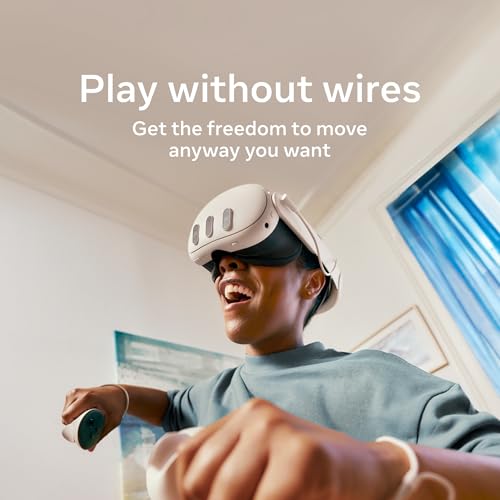
The dual RGB cameras deliver full-color passthrough that’s actually useful beyond novelty. I used mixed reality to pin virtual screens to my wall and to overlay fitness metrics while doing a workout. The alignment isn’t always perfect for very complex real-world surfaces, but for the majority of casual mixed-reality uses it feels polished.
Battery life and daily usage
This headset is built for quality over marathon sessions. On average, I got about two to two-and-a-half hours of continuous gameplay—good for a couple of shorter sessions but not for marathon play. The charging ecosystem is standard USB-C and there are official and third-party battery packs if you need extended life.

Controllers, tracking and input
The Touch Plus controllers feel comfortable and accurate. They track well without external beacons, and haptics are satisfying for most interactions. I noticed improved responsiveness in hand-based input compared to older standalone hardware.
Storage, software and game access
512GB feels liberating for VR: you can keep several large titles, media files, and mixed-reality apps without constantly uninstalling. The included three-month Meta Horizon+ trial gives instant access to a sizable catalog, which is a practical perk if you want to test different genres quickly.
Setup and ecosystem
Setup is simple and fast. Pairing the headset to the companion app and walking through guardian setup took minutes. If you plan to connect to a VR-ready PC for higher-fidelity PCVR, you’ll need a compatible link cable or fast Wi‑Fi for Air Link—those are optional but expand the headset’s capabilities.
Who should consider this headset?
I’d recommend this if you want a top-tier standalone experience without being tethered to a PC, you care about visual fidelity, and you value having plenty of local storage. If you need marathon battery life or are on a tight budget, there are trade-offs to consider.
My closing thoughts
I came away impressed by how much punch Meta squeezed into a standalone package: sharper visuals, stronger GPU performance, and a spacious 512GB that changes how you manage VR content. Battery life and fit considerations keep it from being perfect, but for most people who want a powerful, wireless VR headset that’s ready out of the box, this is one of the most compelling choices on the market.
FAQ
Expect around 2 to 2.5 hours of active gaming on average. Battery life varies with screen brightness, refresh rate, and how graphically intense the software is. For longer sessions, consider an official or third-party battery pack or plan short breaks between play blocks.
No. The headset is fully standalone and runs games natively. If you want PCVR titles, you can connect via a USB-C link cable or use wireless streaming (Air Link) with a compatible PC and fast Wi‑Fi.
Yes—color passthrough makes mixed-reality features practical for things like virtual screens, fitness overlays, and simple object placement. It’s not a perfect replacement for high-end AR devices, but it’s a notable and usable step forward for consumer mixed reality.
Game sizes vary widely, but with modern VR titles and media, 512GB gives you the freedom to keep many large games and media files installed simultaneously—meaning less time spent uninstalling and reinstalling.
Many people with glasses can get a comfortable fit, but it depends on frame size. The headset includes a standard facial interface and there are official and third-party spacer inserts designed for glasses that help improve comfort.
Absolutely. The untethered design and reliable inside-out tracking make it great for active apps, workouts, and rhythm games. Just be mindful of battery limits for extended exercise sessions, and set up a safe guardian boundary before starting.
Onboard storage mainly affects how many apps and media you can keep locally. Performance and load times are driven primarily by the processor and storage speed; having ample free space helps keep load times snappier than a near-full drive.
Yes—the main wins are visible clarity, improved GPU performance, and better mixed-reality passthrough. If you’re coming from an older model, these upgrades are noticeable in day-to-day use.








 Germany
  France
  Netherlands
  Canada
  United Kingdom
  United States
  Turkey
  Croatia
  Spain
Spain  Italy
Italy  India
India
At $599.99 for 512GB — feels steep. I might wait for sales. Anyone scored one on discount recently?
Comparison thought: how does this stack against other standalone headsets out there in terms of ecosystem? I know Meta has a big library but curious about cross-buy or third-party titles.
Meta’s ecosystem is currently the largest for standalone VR, with many first-party titles and a wide third-party developer base. Cross-buy varies by developer; some titles offer it across platforms but it’s not universal.
4K VR that ‘actually wows’ — I thought 4K in a headset was a myth perpetuated by marketers. Anyone else feel like ‘4K’ is more of a buzzword here?
Marketing aside, I compared it side-by-side with a Quest 2 and the difference was noticeable — crisper text and less screen-door effect.
Fair point. The Meta Quest 3 marketing leans on per-eye resolution and improved pixel density. It’s not 4K in the traditional single-display sense, but the overall image quality is a clear step up from previous Quest models.
Heads up for folks prone to motion sickness: did a few demos and felt a bit woozy in fast-paced scenes. Refresh rate options help, but be cautious if you’re sensitive.
Motion comfort settings in many games let you switch to teleport or snap-turn — those helped me stay in longer sessions without nausea.
Good warning. The 120Hz capability can reduce motion-related issues but not eliminate them. Starting with shorter sessions and using comfort mode in games helps a lot.
I love the idea of untethered power and better visuals, but battery life is a dealbreaker for me. 2.2 hours? That’s barely a movie marathon.
Also curious about heat — does the headset get warm during heavy gameplay? Might affect comfort.
If you plan long sessions, consider PC-VR via Air Link or a link cable — offloads processing and can improve thermal/battery. But then you’re not fully wireless anymore.
For me the tradeoff is worth it; the visuals are so much better I can live with shorter sessions. But ymmv.
You’re not alone on that. The extra processing power does generate more heat than older models. In my testing it warmed up noticeably during long, graphically intense sessions but wasn’t uncomfortably hot. The battery limitation is the tradeoff for a compact standalone headset.
Totally — I felt some warmth on the forehead after an hour of Blade & Sorcery. A light sweat, nothing dramatic. Good facial interface helps.
Tried the mixed reality demos at a store and ngl, the passthrough tech is surprisingly good 🤯
Objects look anchored pretty well, and the color passthrough makes mixed-reality experiences feel more natural.
That said, some apps still feel like gimmicks — but the tech is promising.
Also tiny typo in the review: you wrote ‘grafical’ instead of ‘graphical’ in one spot. 😉
Nice catch on the typo, Hannah — fixed it, thanks! Glad you enjoyed the MR demos; it’s one of the areas where the Quest 3 shows meaningful progress.
Gimmicks exist but I found a couple of MR apps genuinely useful for productivity demos — virtual monitors are neat.
Agree — the mixed reality is the ‘wow’ factor for casual demos. Devs will improve it rapidly, I think.
The passthrough was my favorite too. Not perfect, but 10x better than previous attempts.