
 admin
admin I put the Corsair Void RGB Elite and HyperX Cloud Alpha head‑to‑head — which one actually let me hear enemies across the map, game for hours pain‑free, and feel like the better buy?
Ready to settle a headset feud? I’m comparing the Corsair Void RGB Elite and HyperX Cloud Alpha to help you pick the best gaming headset for comfort, sound, and value. I’ll test features, performance, and real-world use across platforms to confidently recommend one for you.
RGB Immersion

I appreciate how immersive and customizable the headset is on PC — the 7.1 surround, large drivers and iCUE control give me a lot of flexibility. It’s comfortable for long sessions but the USB-focused design and occasional reliability complaints make me cautious if you need cross-platform simplicity or ultimate long-term dependability.
Extended Comfort

I find this headset excels at sound clarity and comfort for long sessions — the dual-chamber drivers are a real differentiator. It’s a very reliable, well-built wired option, though the detachable mic and cable demand careful connection to avoid occasional mic issues.
Corsair Void Elite
HyperX Cloud Alpha
Corsair Void Elite
HyperX Cloud Alpha
Corsair Void Elite
HyperX Cloud Alpha
CORSAIR VOID RGB Elite Wireless: Unboxing and 7.1 Surround Sound Review
Design, Build and Comfort: Which feels better long-term?
I’ll evaluate fit, materials, and overall build so you know which headset you can wear for marathon sessions. I tested clamping force, headband padding, ear-cup materials, weight, adjustability, and cable quality to judge long-term comfort and durability.
Fit & clamping — how they sit on your head
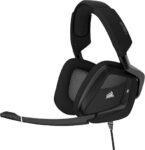
Corsair Void RGB Elite: The Void has a firmer clamp and a heavier feel (about 0.88 lb / ~400 g). Its headband padding is adequate but on the thinner side, so the tighter clamp keeps things secure but can become noticeable after several hours.


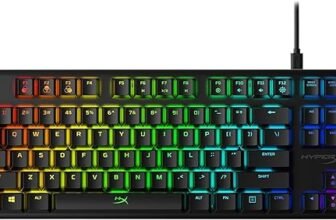
HyperX Cloud Alpha: The Cloud Alpha is noticeably lighter (~298 g) and uses an expanded headband with softer padding. The clamp is more relaxed and distributes pressure better across the skull, making long sessions feel less fatiguing.


Materials, heat buildup and perceived durability
Corsair uses breathable microfiber mesh and memory-foam earpads—these ventilate better and reduce heat buildup over time. The Void’s exterior relies more on molded plastic with RGB accents (aluminum yokes in places), which looks flashy but feels less rugged.
HyperX pairs plush memory-foam cups with pliable leatherette that initially feels plusher and more luxurious. The leatherette traps more heat than the microfiber, but the aluminum frame and metal sliders give the Cloud Alpha a clear durability and premium feel.
Overall, Corsair wins on coolness and padding materials; HyperX wins on weight distribution and long-term structural durability.
Sound performance: Clarity, bass, and 7.1 surround
Overall tonal balance and clarity
I compare how each headset handles details: HyperX Cloud Alpha delivers clearer mids and vocals — instruments and footsteps sit more defined in the mix. The Corsair Void RGB Elite emphasizes low end and impact, which is great for explosions and movie rumble but slightly masks mid-range detail at higher volumes.
Bass behavior — dual-chamber vs single-driver
HyperX’s dual-chamber drivers shine here: they isolate the bass cone so bass is tighter, less distorted, and doesn’t bleed into mids. The result is punchy but controlled bass that preserves clarity.
Corsair’s single 50mm driver produces stronger, more boomy low-end out of the box, especially with 7.1 enabled — you feel hits more than you hear separation.


Soundstage, imaging and directional cues (FPS testing)
Corsair’s virtual 7.1 widens perceived space; footsteps feel farther away and immersion increases in single-player or cinematic scenes. However, when I tested in CS:GO and Apex, HyperX’s stereo imaging offered crisper directional cues and faster pinpointing — better for competitive play where exact bearing matters.
EQ flexibility and software tuning
Corsair iCUE gives on-headset DSP, per-ear EQ, and a toggleable 7.1 virtualizer — easy to tune for movies or music without third-party tools. The trade-off is USB-only features and limited cross-platform support.
HyperX ships as a neutral, well-tuned stereo headset with no native EQ app — great for plug-and-play cross-platform use, but you’ll need OS or third-party EQ for further tuning.


Use-case notes
For competitive FPS I prefer the Cloud Alpha’s precision. For movies and immersive single-player sessions the Void Elite’s punchy bass and virtual 7.1 feel more cinematic.
Microphone, connectivity and compatibility: Communication essentials
Mic clarity and noise handling
I found the HyperX Cloud Alpha’s detachable boom mic to be tighter and more focused on my voice — its noise‑cancelling capsule rejects room hum and keyboard noise better for clear team chat or streaming. The Corsair Void Elite’s omnidirectional USB mic is clear and Discord‑certified, but it picks up more ambient sound because it captures a wider area.
DSP, software and mute/usability
Corsair’s USB connection lets iCUE apply on‑board DSP (EQ, mic processing, mute LED) which can noticeably improve intelligibility on PC. That makes it handy for streaming without extra hardware. HyperX is analogue: no built‑in DSP, so you rely on the host or an external interface for processing. I also prefer the Cloud Alpha’s detachable boom for positioning, replacement, and removing the mic when you only want headphones. Corsair’s flip‑up mute and LED indicator are convenient and failproof for quick muting.
Connections and platform support
Here’s how each behaves across platforms:
If you need plug‑and‑play console compatibility, choose HyperX. If you want PC DSP and an all‑in-one USB solution for clearer on‑PC chat, Corsair is stronger — but only on PC.
Value, durability and who should buy which headset
Price vs features
I looked at typical Amazon pricing: the HyperX Cloud Alpha commonly sits around $70, while the Corsair Void RGB Elite USB usually sells higher and fluctuates (often in the $80–$120 range depending on sales). For that extra cost you get Corsair’s USB-only perks (iCUE, on‑board 7.1, RGB)—valuable if you use a PC. If you want straightforward performance for multiple platforms, HyperX gives more bang for the buck.
Build quality, warranty and likely lifespan
Both headsets ship with a 2‑year warranty, but their designs differ in serviceability. I expect the Cloud Alpha to last longer under regular use because of its simple, durable aluminum frame and detachable braided cable and mic—parts you can replace or swap easily. The Void Elite has aluminum yokes and comfy pads, but the USB cable and software dependency introduce more failure points (users report intermittent USB issues). In short: Cloud Alpha = more repairable and predictable longevity; Void Elite = feature-rich but potentially more fragile over years.
Who should buy which headset
Practical buying tips
Feature Comparison Chart
Final verdict: My recommendation
I pick the HyperX Cloud Alpha as the overall winner — its comfort, durable aluminum frame, and neutral, detailed sound make it my go-to for long sessions and multiplatform play.
Choose the Corsair Void RGB Elite only if you prioritize PC-focused virtual 7.1, USB plug-and-play convenience, and flashy RGB. Ready to buy? I’d grab the Cloud Alpha for longevity and audio fidelity. Happy gaming — pick what improves your play today and enjoy.







 Germany
  France
  Netherlands
  Canada
  United Kingdom
  United States
  Turkey
  Croatia
  Spain
Spain  Italy
Italy  India
India
I liked the breakdown of specs. One small nit: photo of the Corsair made it look bigger than in reality.
Otherwise, useful read!
Photos can lie 😂 Had to measure my desk space before buying once.
Agree on that — product photography sometimes exaggerates sizes. Glad you enjoyed the article.
Thanks — I’ll double-check the photo scale and captions in the post. Appreciate the heads up.
Question for the group: for competitive CS/Valorant, is the stereo imaging on the Cloud Alpha noticeably better than Corsair’s 7.1? I thought 7.1 helps but some folks say stereo is better for pinpointing footsteps.
Short answer: many pros prefer good stereo imaging over virtual surround for pinpointing in shooters. The Alpha’s design tends to give clearer positional cues in those games.
Sophie: Yes — virtual surround can sometimes smear directionality. If you’re MMR-focused, go stereo and tune EQ if needed.
Been using the Corsair Void USB for casual gaming and music. Pros: the RGB looks dope on camera and the USB connection is plug-and-play. Cons: the 7.1 felt kinda gimmicky in some titles and the headset runs a tad warm after long use.
If you’re an audiophile, neither might satisfy you fully, but for most gamers the Corsair will be ‘good enough’ if you want the convenience.
Warmth is a common complaint with closed designs and thicker pads. Good to call out the trade-offs.
I swapped to velour pads on another headset and it helped a lot with heat. Worth trying if you want the Corsair but hate warmth.
Noah: Pads are replaceable but not as easily as the Alpha’s. Still doable though.